A guide for your puzzle table · 5 minute read
Where does this jigsaw piece go?
Start with the smallest distinctive detail you can see. A line, letter or change of color can give you a more useful place to look than the piece’s overall color.
This guide is for a loose piece you already have. Puzzle Pointer helps inspect possible artwork locations; it does not supply replacement pieces.
01 · Make the clue visible
Look past the main color.
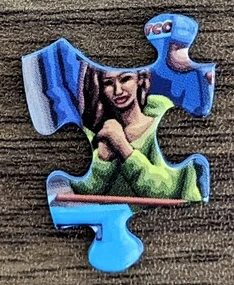
Turn the piece face up under even light. Rotate it and look for a detail with a direction: a roof edge, a stem, a stripe, a face or part of a letter. A blue piece might belong to clothing, a sign or a shadow as easily as sky.
Compare that detail with the box or poster. If you can see a green curve beside a dark outline, look for that combination rather than every green area. Keep a small group of pieces with related details nearby.
02 · Reduce the search area
Choose a region before a gap.
Divide the reference picture into a few recognizable regions: the building, the crowd, the trees, the sky. Place the loose piece near the region its printed details suggest. You do not need to identify its exact row and column immediately.
Within that region, follow a line or object across pieces you have already joined. Compare where a color boundary enters and leaves your loose piece. If those directions do not line up, keep looking even when the colors seem similar.
When everything looks alike
For repeated windows, foliage or large gradients, build outward from a distinctive nearby object. Sort a small working group by pattern or shape instead of trying every remaining piece at once. Set aside an unresolved piece and return when more neighboring pieces are in place.
For another approach to sorting by recognizable sections, see Ravensburger’s speed-puzzling guide. You can use the sorting idea without racing the clock.
03 · Check both picture and shape
A close color match isn’t the final test.
Once you have a likely opening, compare the tabs and sockets before placing the piece. Check the printed lines across each join and whether it sits flat with its neighbors. If you need to force it or a line breaks unexpectedly, leave it out and reassess.
A straight edge can help narrow the search to the border in a conventional rectangular puzzle. Interior shape alone usually leaves multiple candidates. The complete picture helps locate a region; the physical cut helps check a particular opening.
When you want another way to look
Can an app help find a puzzle piece?
A photo helper can compare visible printed detail with a complete reference picture. Puzzle Pointer for iPhone takes a photo of one loose piece and returns an approximate artwork area to inspect when it can locate one.
You need the correct complete artwork and a clear photo of the piece. Some puzzles can be found in the app catalogue; for others you can use a box or poster photo. Repetitive patterns, plain color and glare can make a piece difficult to locate. The app may offer alternatives or no placement.
It does not assemble the puzzle or prove that a piece physically fits. You still compare the printed details and check the cut at your table.
See the photo setup and one real exampleIf a piece is actually missing
Check the workspace, trays, box and floor before concluding it is lost. If it is missing, look up the puzzle maker’s support instructions for your product. Keep the box and identifying details; a location-finding app cannot replace the physical piece.